

AI workflow automation puts AI models inside a business process to read, classify, decide or draft, while integrations move data between your apps. This guide covers how it runs, when it is worth using, the main free and paid tools, and ready-made workflows for office, marketing, sales, service, finance and HR teams. The safest start is one small workflow in an off-the-shelf tool. A custom build makes sense once the workflow touches core systems or sensitive data.
What is AI workflow automation?
AI workflow automation is the use of AI, usually large language models and machine learning, to handle the judgement steps inside a multi-step business process. These are the steps that used to need a person: reading an email, pulling fields out of a PDF, choosing the next action or drafting a reply.
The rest of the workflow is ordinary automation. Integrations pull data from one app, pass it to the AI step and write the result into another app. Human oversight stays in place wherever a wrong output would be costly.
The difference from older automation is the input it can handle. AI steps work with unstructured data such as free text, documents and images, and they cope with variation that would break a fixed rule.
How an AI workflow runs
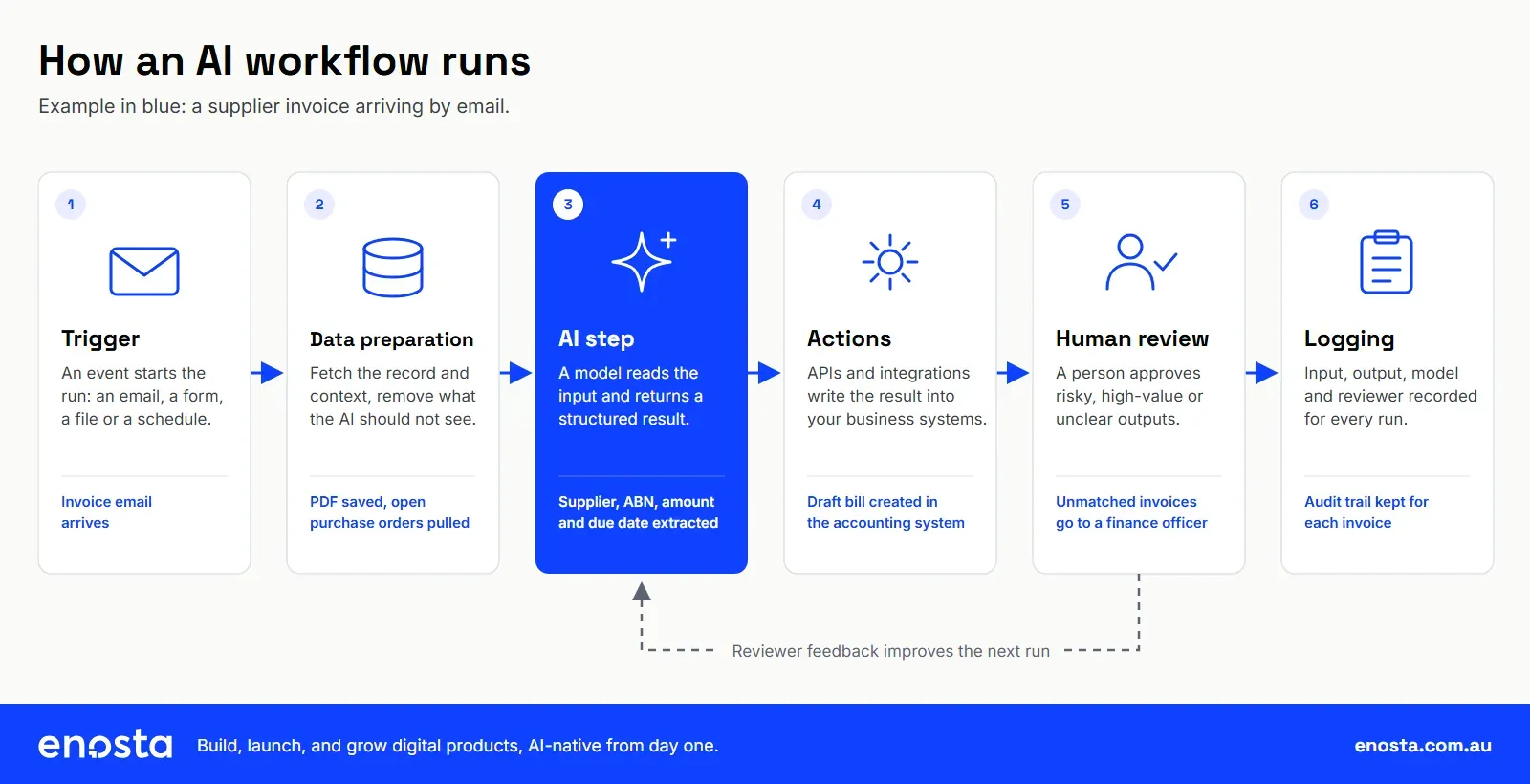
Every AI workflow follows the same basic path, whatever tool runs it.
- Trigger: An event starts the workflow, such as a new email, a form submission, a file in a folder or a schedule.
- Data preparation: The workflow fetches the record and the context it needs, and removes anything the AI step should not see.
- AI step: A model reads the input and returns a structured result, such as a category, extracted fields, a decision with a reason or a draft.
- Actions through APIs and integrations: The result is written into business systems, such as a CRM, an accounting platform, a help desk or a spreadsheet.
- Human review: A person approves, edits or rejects outputs above a risk threshold, such as payments or customer-facing messages.
- Logging: Each run is recorded with its input, output and reviewer, so errors can be traced and fixed.
Here is an illustrative example, not a client case. A supplier invoice arrives by email. The AI step extracts the supplier, ABN, amount and due date, then matches the invoice to an open purchase order. Matched invoices under an agreed amount go into the accounting system as drafts. Anything unmatched goes to a finance officer with the fields already filled in.
AI workflow automation vs rule-based automation and RPA
AI workflow automation does not replace rule-based automation or robotic process automation (RPA). It covers the steps they cannot handle well, and most real workflows mix all three. Business process automation is the umbrella term for automating a process end to end.
| Factor | Rule-based automation | RPA | AI workflow automation |
|---|---|---|---|
| Typical input | Structured data from apps and forms | Screens and fields in existing software | Free text, documents, images and structured data |
| How decisions are made | Fixed if-then rules | Recorded steps a bot repeats | A model interprets the input and returns a result |
| Handling change | Breaks when the format changes | Breaks when the screen changes | Copes with variation, but output can be wrong |
| Typical use | Moving data between apps | Legacy systems without APIs | Reading, classifying, deciding and drafting |
| Main risk | Missed edge cases | Fragile scripts | Incorrect or inconsistent outputs |
The AI step itself comes in three common types:
- Prompt-based step: One instruction to a model, such as "summarise this ticket" or "extract these fields".
- Retrieval-augmented generation (RAG): The workflow first pulls approved company information, then asks the model to answer from it.
- Agentic workflow: An AI agent plans the steps, calls tools and decides what to do next, within limits the team sets.
When AI workflow automation is worth it
AI workflow automation pays off when people spend time reading and sorting before they can act. Use it when most of these are true:
- The task runs at high volume, every day or every week.
- The work has unstructured input, such as emails, PDFs, chat messages or call notes.
- The work needs a judgement step that follows clear guidelines.
- A wrong output can be caught by a review step before it causes harm.
Simple automation is the better choice in other cases:
- The data is already structured and the process runs on stable rules that rarely change.
- There is low tolerance for error and no time for review, such as final payroll calculations.
- The process runs a few times a month, so setup costs more than it saves.
Not sure which process to automate?
We review your processes and point to the one with the clearest return before you spend on tools.
AI workflow automation tools: free and paid
Six tools cover most needs, from no-code builders for business teams to platforms technical teams can self-host. Each free option and starting price comes from the vendor's official pricing page in November 2026, in the currency the vendor shows.
| Tool | Free option | Paid from | Best for |
|---|---|---|---|
| Zapier | Free plan, 100 tasks a month, two-step Zaps | US$19.99 a month, billed yearly | Business teams connecting popular SaaS apps quickly |
| Make | Free plan, 1,000 credits a month, 3,500+ apps | US$9 a month, billed annually | Visual multi-step workflows with branching and AI agents |
| n8n | Free self-hosted Community Edition | €20 a month for cloud Starter, billed annually | Technical teams wanting control, self-hosting and custom code |
| Microsoft Power Automate | 30-day free trial | AU$22.40 per user a month, paid yearly, excluding GST | Companies already running on Microsoft 365 |
| Activepieces | Free plan, 1,000 credits a month, up to 5 users | US$20 a month, flat | Small teams wanting an open, simple builder |
| Gumloop | No free plan listed on the pricing page | US$37 a month with 20,000 credits | AI-first workflows and agents for operations and marketing |
A quick way to choose:
- Mostly SaaS apps and no developers: Start with Zapier or Make.
- Complex branching or many steps: Make or n8n handle this better than linear builders.
- Data must stay on your own servers: Self-host the n8n Community Edition, and budget for someone to run it.
- Microsoft 365 shop: Power Automate fits your existing accounts and permissions.
Prices and plan limits change often, so check the pricing page before you commit. Also count the AI model cost. Some tools include AI credits in the plan, while others ask you to connect your own OpenAI, Anthropic or Google account and pay for usage separately. For a pilot, the plan cost is usually small next to the time your team spends building and reviewing the workflow.
How each tool builds AI workflows
Every tool in the table can run an AI workflow, but each one builds it in a different way. The short guides below show what the AI features look like in practice, with an official image or video for each tool.
Zapier
Zapier connects thousands of SaaS apps through Zaps, which run a trigger and a chain of actions. AI enters in three ways. You can add AI steps inside a Zap. You can describe a workflow in plain English and let Zapier Copilot draft it. You can also set up Zapier Agents that work through a goal with the apps you allow. The free plan includes Copilot and two-step Zaps, which is enough to test a simple AI step.
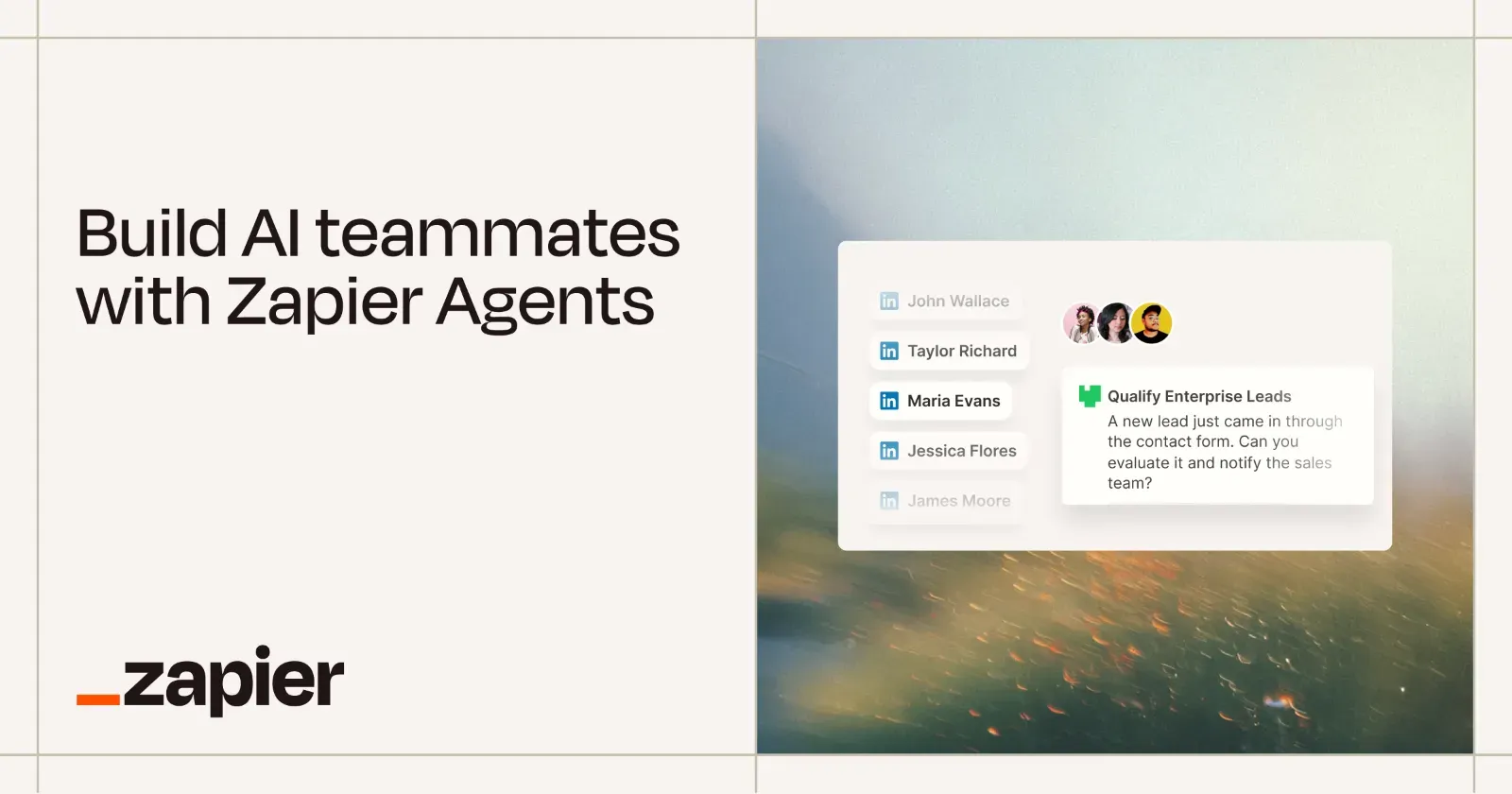
Zapier fits business teams that live in popular SaaS tools and want results without developers. Its official video shows an AI agent built for a social media workflow.
Official tutorial from the Zapier YouTube channel
Make
Make shows each workflow, called a scenario, as connected modules on a visual canvas. Its AI Agents feature, available on all plans, adds an agent module that reads the input, decides which tools to call and passes results to the next steps. The screenshot from Make's own site shows a content marketing agent triggered by a webhook, which logs sources in Notion and creates product, social media and blog documents.
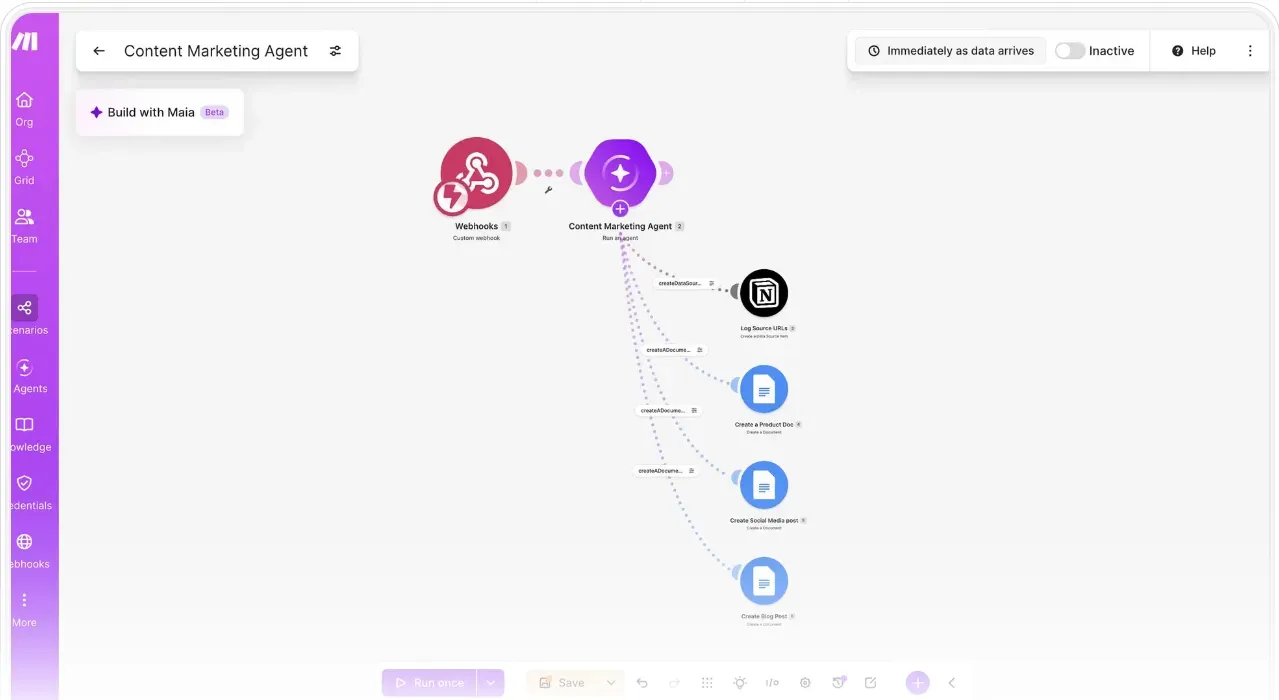
Make suits teams that need branching, filters and many steps in one view. Its beginner video uses a simple pattern: get the data, prompt the AI, then transfer the result to another app.
Official beginner video from the Make YouTube channel
n8n
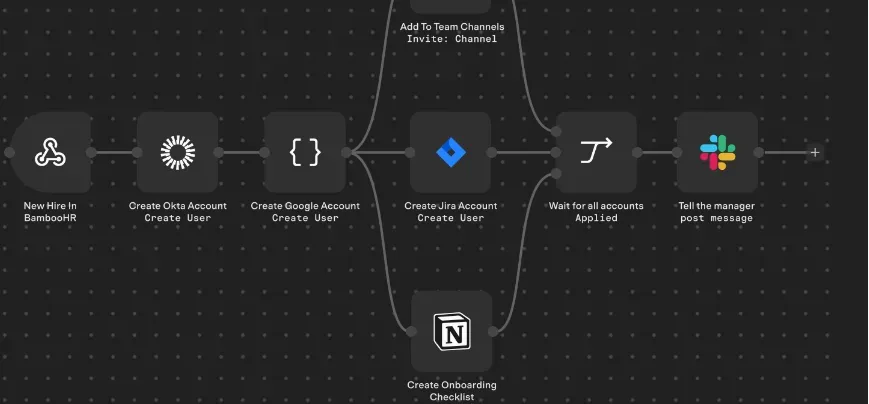
n8n is a workflow platform for technical teams. Its AI Agent node connects a language model to memory, tools and an output parser, and every other node can call APIs or run custom code. You can use n8n Cloud or self-host the free Community Edition, which keeps data on your own servers. The screenshot shows a new starter workflow from the n8n site that creates accounts and a checklist, then tells the manager in Slack.
Official quick start produced by n8n with Flowgrammer
Microsoft Power Automate
Power Automate runs cloud flows between Microsoft 365 and other apps, and desktop flows that automate older software through the screen. Copilot in Power Automate lets you describe a flow in natural language and then edit it, and AI Builder adds models for reading documents and classifying text. Agent flows and AI agents now sit alongside Copilot Studio. It fits companies that already manage identity, data and permissions in Microsoft 365. Microsoft's own explainer shows how agents and workflows come together.
Official explainer from the Microsoft Mechanics YouTube channel
Activepieces
Activepieces is an open source automation builder under the MIT licence, often described as an open alternative to Zapier. Its integrations, called pieces, are also available as MCP servers, so AI assistants can use them as tools. Teams can use the cloud version or self-host it. It suits small teams that want a simple builder and the option to keep control of the code. The official quick start shows a first automation in about six minutes.
Official quick start from the Activepieces YouTube channel
Gumloop
Gumloop is built around AI first. You create agents and flows that use more than 35 AI models, with credits included in the plan, and connect them to the tools your team uses. It suits operations and marketing teams that want AI agents doing research, writing and data tasks without building a classic trigger and action workflow. The official getting started video builds a first agent step by step.
Official getting started video from the Gumloop YouTube channel
To try any of them, start from a template, connect only test data, and run the workflow once by hand before you switch it on.
Ready-made AI workflows by team
The fastest way to start is to copy a proven workflow and adapt it. Each example below names the trigger, the AI step and the output. These are common patterns, not client cases.
Office and admin
- Inbox triage: A new email arrives, AI tags it by topic and urgency, and the workflow files it or drafts a reply for approval.
- Meeting notes to actions: A recording or transcript lands in a folder, AI summarises decisions and owners, and tasks appear in your project tool.
- Document intake: A contract or form is uploaded, AI extracts the key fields, and a record is created in a spreadsheet or database.
Marketing
- Content repurposing: A new blog post is published, AI drafts social posts and a newsletter blurb, and drafts wait in a review queue.
- Review and survey analysis: New reviews or survey answers arrive, AI groups them by theme and sentiment, and a weekly summary goes to the team.
- Competitor monitoring: A schedule runs a web search, AI summarises changes, and the summary is posted to a team channel.
Sales
- Lead qualification: A web form or message arrives, AI scores the lead against your criteria and updates the CRM record.
- Call summaries: A sales call ends, AI writes a summary and next steps, and the CRM is updated for the account owner to check.
- Proposal first drafts: A deal reaches a stage, AI drafts a proposal from approved templates, and the owner edits it.
Customer service
- Ticket routing: A ticket is created, AI classifies the issue and urgency, and the ticket goes to the right queue.
- Reply drafts: AI drafts an answer from approved help articles, and an agent reviews it before sending.
- Feedback loops: Closed tickets are grouped by root cause each week, so product teams see repeat issues.
Finance
- Invoice capture: Invoices arrive by email, AI extracts fields and matches purchase orders, and drafts go into the accounting system.
- Expense checks: Receipts are uploaded, AI checks them against policy, and exceptions go to a manager.
- Collections reminders: Overdue invoices trigger AI-drafted reminders that a finance officer approves.
HR and IT
- New starter onboarding: A new hire is added to the HR system, and accounts, channels and an onboarding checklist are created automatically.
- Candidate screening support: AI summarises applications against the role's criteria, and a hiring manager makes every decision.
- IT help desk: AI answers common questions from the knowledge base and escalates the rest with a summary.
Where to find templates
Each major tool keeps an official library you can copy from, and the open source community adds more on GitHub:
- Zapier: The Zapier templates library is organised by app and use case.
- Make: The Make templates library includes AI scenarios you can open in your own account.
- n8n: The n8n workflow library covers AI agents, document processing and IT workflows.
- GitHub: The awesome-n8n-templates collection lists more than 280 free n8n templates and had over 26,000 stars in November 2026.
Community templates are not vetted, so check every credential, permission and data flow before you connect real accounts.
Which workflow to automate first
The best first workflow is frequent, measurable and low risk. Score each candidate against these six criteria and start with the one that meets most of them:
- High volume: The task runs many times a week, so small time savings add up.
- Repeatable: Repeatability matters because most cases should follow the same pattern, with few exceptions.
- Measurable baseline: Baseline metrics come first. You can count today's time per case, error rate or turnaround.
- Low risk if wrong: A review step catches errors before they reach a customer or a payment.
- Manageable data sensitivity: The data can stay within approved systems and privacy obligations.
- Clear owner: A named process owner can decide on changes.
When a tool is not enough
Off-the-shelf tools handle most first workflows. A custom build pays off when one or more of these signals apply:
- Core systems: The workflow writes into your product, ERP or a legacy system without a ready connector.
- Sensitive data: Customer, health or financial data must stay inside your own cloud account and access controls.
- Complex logic: The process has many branches, approvals or exceptions that are hard to manage in a visual builder.
- Volume and cost: Run volumes are high enough that per-task or per-credit pricing becomes expensive.
- Ownership: You need the code, prompts and logs in your own repository so your team can maintain them.
This is the work of the Agentic Workflow Automation service at Enosta. The team maps the process, designs the review steps, and builds AI agents that run inside your own systems and cloud accounts. AI agents and copilots draft specs, code and tests in every sprint, and engineers own the architecture and review the work. You own the code, documents and cloud accounts from day one.
Build the workflow your tools cannot
Get a team that maps the process, builds the agents and hands you the code.
How to start: a 30-day pilot
A time-boxed pilot on one process is the safest way to start. Thirty days is long enough to see real cases and short enough to stop without much loss.
Stage 1: Map the process
Write a process map of how the work runs today, one row per step, not how the policy says it should run. Record the input, the system, the decision points, common exceptions, the owner and the time per case. The map usually shows which step is the real bottleneck. That step is where the AI should go, and it is often smaller than the whole process. Share the map with the people who do the work, because they know the exceptions that are missing from the policy.
Stage 2: Set the baseline and success rule
Measure the current process for a week or two: volume, time per case, error rate and turnaround. Then agree in writing on an accuracy threshold for reviewed cases and the time saving that makes the change worth it.
Stage 3: Run the pilot with human review
Build the smallest version that runs on real cases. Every output goes to a reviewer, who approves, edits or rejects it. Adjust prompts, rules and data preparation each week based on the review log.
Stage 4: Scale, change or stop
Compare the results with the success rule. If it is met, reduce review to risky cases and plan the production build. If results are close, fix the weak step and run another short cycle. If they are far off, stop and pick a different process.
Risks and how to control them
AI workflows fail in predictable ways, and each risk has a practical control. Design these controls before launch:
- Wrong outputs: Use structured outputs, confidence thresholds and human review for anything customer-facing or financial.
- Data leaving approved systems: Send only the fields the AI step needs, and use settings that stop providers training on your data.
- Privacy obligations: Check how personal information is handled under the Privacy Act 1988 before a workflow touches customer or staff data.
- Weak access control: Give each workflow its own service account with the least access it needs.
- No audit trail: Log inputs, outputs, model version and reviewer for every run.
- Unclear accountability: Name the person who owns the workflow and approves changes.
Automate without risking customer data
Get a fixed quote within 48 hours for a workflow built with access control, logging and review from day one.
Frequently asked questions
Can I do AI workflow automation for free?
Yes, for small volumes. Zapier, Make and Activepieces offer free plans with monthly limits, and the n8n Community Edition is free if you host it yourself. Model usage can cost extra when you connect your own AI provider.
Do we need developers to automate workflows with AI?
Not for a first pilot in a no-code tool. You need developers when the workflow writes into your own product or legacy systems, handles sensitive data, or needs version control, testing and monitoring.
Can AI workflow automation work with older systems?
Yes. If the system has an API, the workflow can read and write through it. If it does not, options include database access, file exports or RPA for the screen steps, with the AI step handling the reading and deciding.
Is an AI agent the same as an AI workflow?
No. An AI workflow follows a path the team designs, with AI handling some steps. An AI agent decides its own next steps and calls tools to reach a goal. Production systems often combine both.